

Search for Answers/OptiShot Help & Support/FAQ's
How do I update video drivers?

Jonathan B Cole
posted this on August 09, 2011 04:19 pm
One of the most common reasons a computer will have difficulties running OptiShot is because it does not have the most recent video drivers.
Computer manufacturers do not continually update the video drivers for the computers they sell. Because of this, it is not uncommon for a two year old computer to be unable to run the latest graphics intensive software such as video games and the OptiShot Simulator.
For this reason, it is important to get video drivers from the actual graphics card manufacturer. The problem with this is that graphics card manufacturers try to detect the driver currently installed on computers. If they find a driver from the computer manufacturer installed, they will deny you their latest version.
The directions below get around these checks and will help you the latest version possible for your video card.
This is a 3 step process.
- Identify the Manufacturer and Type of video card you have.
- Locate and download the latest drivers from the manufacturer.
- Remove the current drivers and install the new drivers.
STEP 1: FIND THE NAME AND THE MANUFACTURER OF THE VIDEO CARD
- Windows® Vista and Windows® 7
- Click Start
- Click in the Search box found at the bottom of the Start menu and type dxdiag and hit Enter.
- Windows® 8
- Click the Windows key on your keyboard.
- Type in dxdiag and hit Enter.
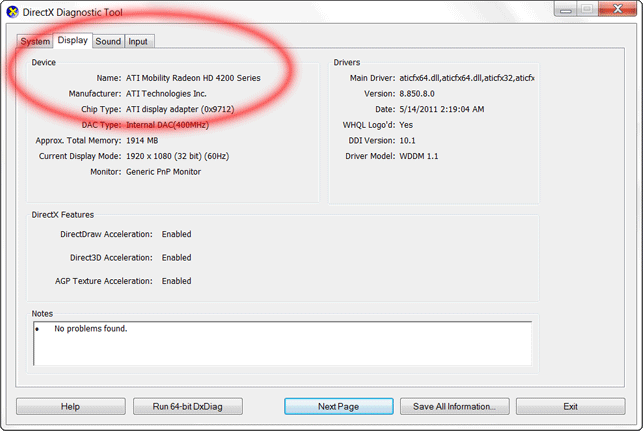
- On the DirectX Diagnostic Tool click the tab labeled Display.
- From the Device section write down the Name and Manufacturer.
STEP 2: download THE LATEST DRIVERS FOR YOUR VIDEO CARD
Using the information from Step 1, click the appropriate link below to go to your card's website and locate the latest drivers.
- NVIDIA CARDS
- NVidia Driver Site
- Select Option 1 or Option 2 and follow the instructions.
- ATI CARDS
- ATI Driver Site
- Follow the 5 steps and any further instructions.
- INTEL CARDS
- Intel Driver Site
- Use the Find Downloads by Product Name section to locate, download and install your driver.
If you are asked whether you want to Save or Run the application, choose Save.
STEP 3: UNINSTALL THE CURRENT DISPLAY ADAPTER FROM DEVICE MANAGER
- Windows® Vista and Windows® 7
- Click Start
- Right click on Computer (or My Computer) and choose Manage to open the Computer Management window.
- Windows® 8
- Click the Windows key + the X key. + X
- Click on Computer Management in the menu that pops up to open the Computer Management window.
- On the left hand side click Device Manager.
- On the right-hand side, double-click Display adapters to expand the list.
- Right-click the display device in the expanded list and then click Uninstall.
- On the Confirm Device Uninstall window place a check in the box next to "Delete the driver software for this device."
- Click OK to complete the uninstall process. Note: your screen resolution will likely change and look quite poor until we install the new drivers.
- If you are prompted to restart the computer, go ahead and do so.
- Run the driver Installation program you downloaded in Step 2.
At this point you should be able to run OptiShot without any problems. If you are still getting an error message, or OptiShot still won't load, check your computer's specs to make sure you meet all of the minimum requirements.
